With a recent increase in Bad Bot traffic and DDoS attacks, alongside AI becoming more aggressive in crawling sites, we’ve had to explore non-destructive and sustainable methods to mitigate requests to sites that excessively drain server resources.
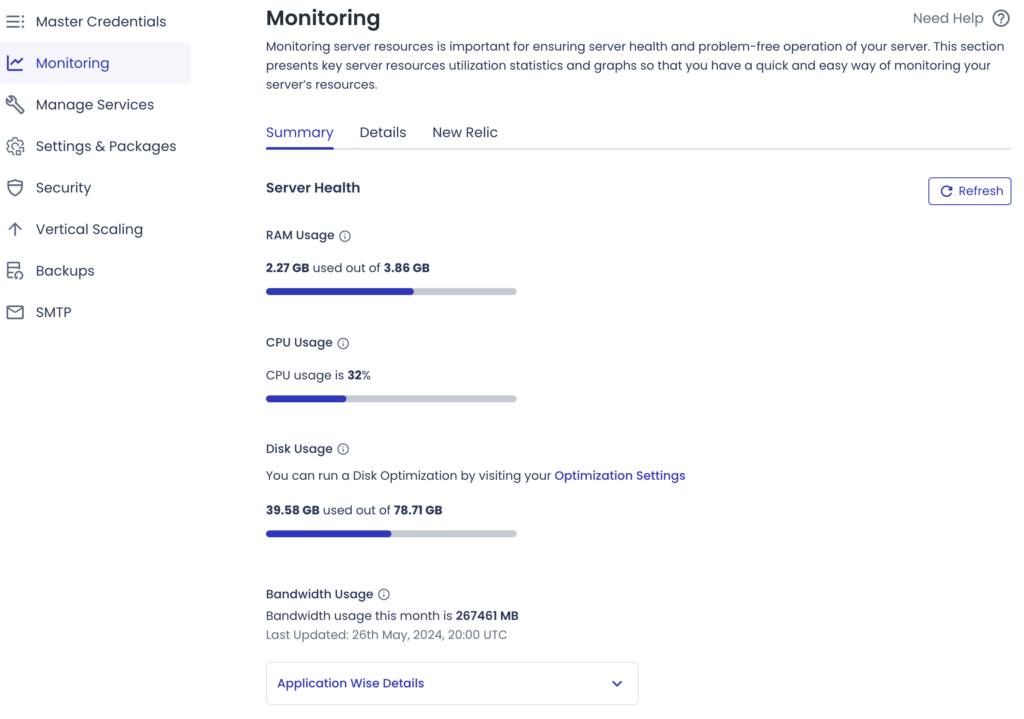
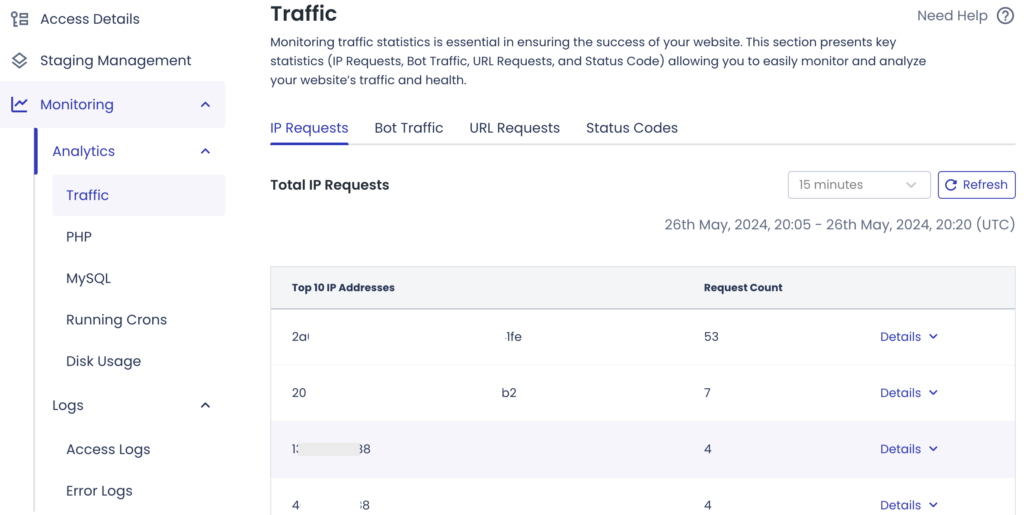
Using Cloudways servers provides us with a great UI to monitor traffic, activity, and error logs.
Server Monitoring UI
Application Monitoring UI
This UI equips us with all the necessary information to promptly address any issues. It provides a list of IPs generating an excessive number of requests, which we can then add to .htaccess using “Deny from [IP Address]” to alleviate the strain on resources, particularly CPU.
After restoring resource levels, we can proactively address server requests. In addition, while configuring our htaccess, we can block all well-known Bad Bot traffic by employing rewrite rules.
You can typically request lists of bad bots from CrowdSec. Depending on your security plugin, you can access these lists via an API key provided by CrowdSec, ensuring continuous updates.
Regarding IP blocking to prevent DDoS attacks, it’s a double-edged sword. From time to time, a bot may generate even more requests than usual. In such cases, you may add this IP to your “Deny from” list or even block a range of IPs if there are multiple corresponding addresses. Typically, blocking a range involves appending the offending IP with Classless Inter-Domain Routing (CIDR).
For this purpose, if the offending IP is 111.111.111.111 and there are other IPs such as 111.111.111.112, 111.111.111.113, 111.111.111.114, etc., we can block a range like so: 111.111.111.0/24. However, a major drawback arises when the requests are from a good bot, cycling through a larger range of IPs and generating more requests than your server can handle creating.
In such instances, we can limit the number of requests from any bot or IP. You can achieve this using the robots.txt or your .htaccess.
In the case of your robots.txt, the aim is to target good bot traffic rather than bad bot traffic, as only good bots tend to adhere to the directives in this file.
# START YOAST BLOCK
# ---------------------------
User-agent: *
Disallow:

# Prevent crawling of certain pages
Disallow: /wp-admin/
Disallow: /wp-includes/
Disallow: /wp-content/plugins/
Disallow: /wp-content/cache/
Disallow: /wp-content/themes/
Disallow: /trackback/
Disallow: /cgi-bin/
Disallow: /comments/
Disallow: /*?s=

# Crawl delay for all bots (not all bots support this)
Crawl-delay: 10

# Specify sitemap location
Sitemap: **[https://example.com/sitemap_index.xml](https://example.com/sitemap_index.xml)**
# ---------------------------
# END YOAST BLOCK

# Specific bot directives
User-agent: AhrefsBot
Disallow: /

User-agent: SemrushBot
Disallow: /

User-agent: MJ12bot
Disallow: /

# Additional specific bots to disallow
User-agent: BLEXBot
Disallow: /

User-agent: DotBot
Disallow: /

User-agent: Yandex
Disallow: /
Disallow Directives:
Prevent crawling of admin, includes, plugins, cache, and themes directories. These are typically non-essential for SEO.
Block URLs that include certain parameters, such as search results (/*?s=).
Crawl-delay:
Adds a delay between successive crawls by the same bot. Note that not all bots respect this directive.
Specific Bot Directives:
Block known aggressive bots such as AhrefsBot, SemrushBot, MJ12bot, BLEXBot, DotBot, and Yandex. These bots can consume significant bandwidth without providing SEO benefits.
For server blocking DDoS attacks within the htaccess, we’ll utilize rewrite rules to manage this, enabling us to handle these via FTP if any issues arise.
This will block specific bad bots based on User-Agent.
<IfModule mod_rewrite.c>
RewriteEngine On
RewriteEngine On
RewriteCond %{HTTP_USER_AGENT} ^.*(SCspider|Textbot|s2bot|MJ12bot|YandexBot|SemrushBot|AspiegelBot|BLEXBot|webmeup-crawler|oBot|Semrush|SiteExplorer|BaiDuSpider).*$ [NC]
RewriteRule .* - [F,L]
</IfModule>
These methods should not significantly harm your site, but we can explore another potential threat to server resources: site cloning. In some cases, your site’s resources may be utilized elsewhere, or in the worst-case scenario, your entire site could be cloned, negatively impacting your rankings. However, in this context, we’re focusing on resource conservation, specifically addressing media hot linking.
This piece of code in your htaccess will block access to other sites using your medial links to show your work. Even if this is shown elsewhere, the request comes from your server and hit your resources, to to prevent this we add:
# Prevent hotlinking for images and PDFs,
<IfModule mod_rewrite.c>
RewriteEngine on
RewriteCond %{HTTP_REFERER} !^$
RewriteCond %{HTTP_REFERER} !^https?://(www\.)?example\.co\.uk [NC]
RewriteCond %{HTTP_REFERER} !^https?://example\.co\.uk [NC]
RewriteRule \.(jpg|jpeg|png|gif|pdf)$ - [F,NC]
</IfModule>
Explanation of Preventing Hot linking:
Opening the <IfModule mod_rewrite.c> Tag:
Checks if the mod_rewrite module is available and processes the contained directives if it is.
Enabling the Rewrite Engine:
Turns on the URL rewriting engine, allowing the use of RewriteCond and RewriteRule.
Allowing Requests with an Empty Referrer:
Allows requests where the HTTP_REFERER header is empty, which includes direct visits and certain privacy-focused browsers.
Allowing Requests from Specific Referrers:
Allows requests from example.co.uk and its subdomain www.example.co.uk.
Blocking Requests to Specific File Types from Unauthorized Referrers:
This applies to requests for specified file types (e.g., .jpg, .jpeg, .png, .gif, .pdf) and blocks access with a 403 Forbidden response if the referrer is not allowed.
Summary
What we have gone through in this post should be enough to protect yourself server side, but you may want to look into what can be done for more persistant DDoS attacks, like Implementing Rate Limiting, using Web Application Firewalls (WAFs), Geo-Blocking and IP Blacklisting or make use of your DNS Migration Service as these services can absorb and filter out malicious traffic before it reaches your server, effectively mitigating large-scale DDoS attacks.
If you want to move away from prebuilt or bought themes and want an award-winning, Belfast based web design and development studio to deliver a project of similar quality, get in touch with the Wibble team to find out how we can help with your website requirements.